Lecture 13 Finger Exercise
Please Log In for full access to the web site.
Note that this link will take you to an external site (https://shimmer.mit.edu) to authenticate, and then you will be redirected back to this page.
Question 1.
Below is a small grid where individual cells are identified by This scenario can be modeled as an undirected graph, where each cell is a node, and adjacent cells are connected by an edge (in the graph, that is).
Suppose we are given such a graph representation, where the neighbors of each cell are listed in the order up, left, right, down.
If such a neighbor is out of bounds or inaccessible, it is not listed.
For example, the neighbors of cell In what order would new locations be discovered using DFS and BFS?
Provide your answer as a dictionary where the keys are Example format:(row, column) tuples.
Our task is to find a path of adjacent cells (adjacent means touching one of the four sides) from the start S at (1, 0) to the goal G at (2, 2).
There is an obstacle at location (1, 2), so it's inaccessible.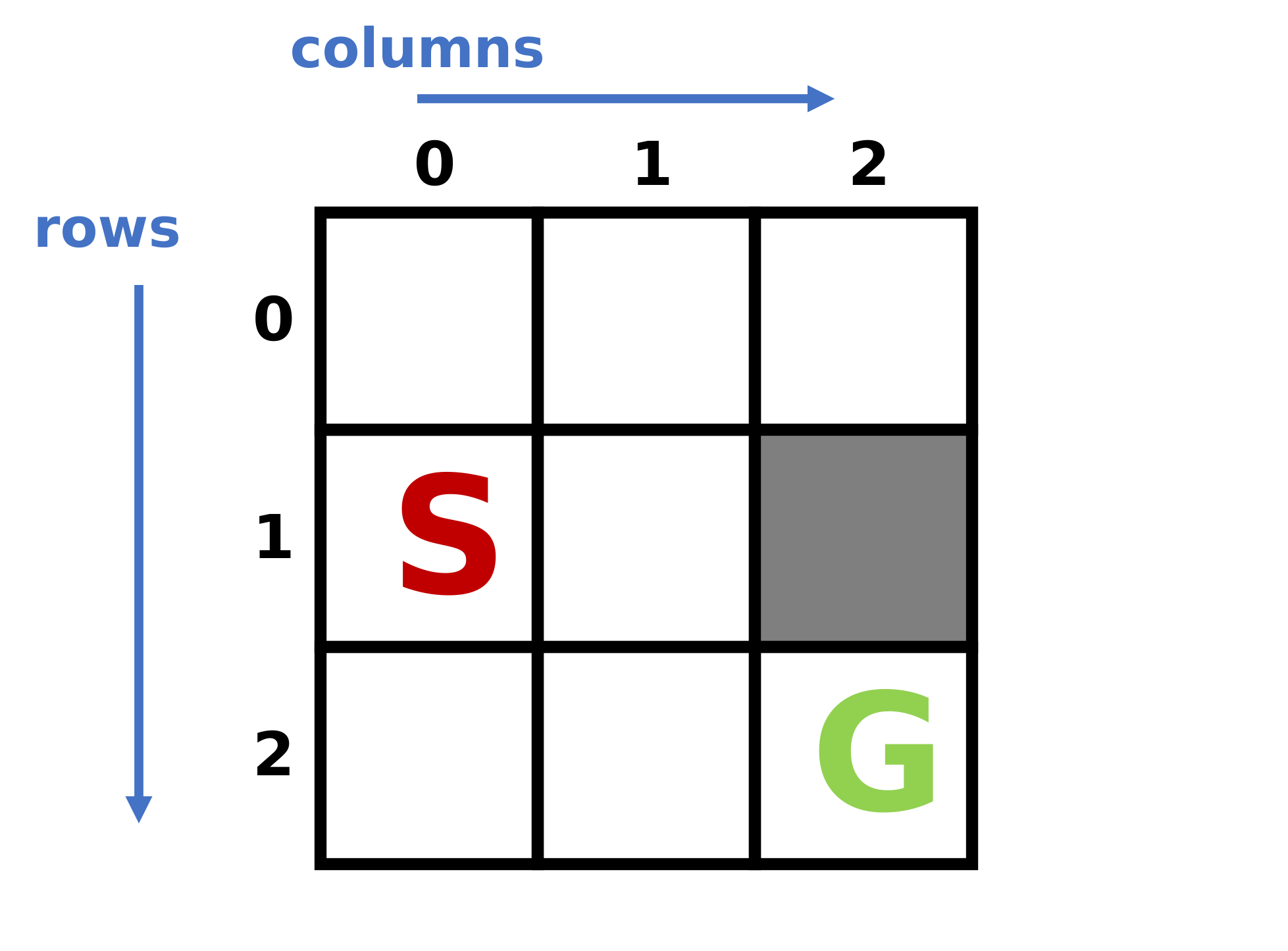
(0, 1) would be given in the order (0, 0), (0, 2), and then (1, 1)."dfs" and "bfs", and each value is a list of tuples.
Include the start as the first discovered location.{
"dfs": [(1, 0), ...],
"bfs": [(1, 0), ...],
}

Question 2.
In Lecture 7, we demonstrated an iterative implementation of bisection search to approximate the square root of a given value.
However, the algorithm can also be understood recursively, where each time we discard half the search range, we need to perform a bisection search on the remaining half.
Implement a recursive version of Hint:
Instead of using a bisection_square_root(x, low, high, epsilon).while loop, approach the problem by identifying the recursive task when the search range is halved, and also the base case when no further halving is needed.
Remember that in code, the base case is typically checked first.def bisection_square_root(x, low, high, epsilon):
"""
Perform bisection search recursively to approximate the square root
of a given number.
Parameters:
x (int or float): The number to find the square root of.
low (int or float): The lower bound of the search range.
high (int or float): The upper bound of the search range.
epsilon (float): The threshold for acceptable error.
Return a float whose square is within epsilon of x.
"""